
Reports
Dashboard metrics, route efficiency reports, revenue analytics, and activity feeds for your service business.
Reports
NextRoute provides built-in reporting across four areas: dashboard overview metrics, route efficiency, revenue analytics, and a real-time activity feed. All reports are accessible from the Reports section in the dashboard and via the API.
Dashboard Overview
The dashboard report provides a snapshot of your business at a glance:
| Metric | Description |
|---|---|
| Total Customers | Count of customers with billing_status = 'active' |
| Revenue MTD | Sum of paid invoice totals for the current month |
| Routes Today | Number of routes scheduled for today |
| Completion Rate | Percentage of planned stops that were completed |
| Active Subscriptions | Count of active customer subscriptions |
Completion Rate Period
The completion rate supports configurable time periods via the completion_period parameter:
today— today's routes onlyweek— last 7 daysmonth— last 30 days (default)all— all time
curl "https://api.nextroute.app/api/reports/dashboard?completion_period=week" \
  -H "Authorization: Bearer YOUR_TOKEN"
Response:
{
  "total_customers": 245,
  "total_revenue_mtd": 1875000,
  "total_routes_today": 4,
  "completion_rate": 96.5,
  "active_subscriptions": 245
}
Note: total_revenue_mtd is in cents ($18,750.00 in this example).
Route Efficiency Report
The route report shows performance metrics for each route over a given date range.
Metrics Per Route
- Planned stops — number of stops scheduled
- Completed stops — number of stops marked complete
- Skipped stops — number of stops skipped
- Completion rate — percentage completed vs. planned
- Optimized distance — estimated distance in miles from route optimization
- Optimized duration — estimated time in minutes
- Actual distance — GPS-tracked actual distance driven
Aggregate Totals
The report also includes totals across all routes in the date range:
- Total routes, total planned, total completed, total skipped
- Total distance and duration
- Overall completion rate
curl "https://api.nextroute.app/api/reports/routes?from_date=2026-03-01&to_date=2026-03-31" \
  -H "Authorization: Bearer YOUR_TOKEN"
Response:
{
  "routes": [
    {
      "id": "rt_abc123",
      "date": "2026-03-15",
      "name": "North Zone - Monday",
      "planned_stops_count": 28,
      "completed_stops_count": 27,
      "skipped_stops_count": 1,
      "completion_rate": 96.43,
      "optimized_distance_mi": 34.2,
      "optimized_duration_min": 185,
      "status": "completed"
    }
  ],
  "totals": {
    "total_routes": 48,
    "total_planned": 1250,
    "total_completed": 1198,
    "total_skipped": 52,
    "total_distance_mi": 1560.8,
    "total_duration_min": 8640,
    "completion_rate": 95.84
  }
}
Revenue Report
The revenue report provides financial analytics with flexible grouping and filtering.
Grouping Options
Use the group_by parameter to control how revenue is aggregated:
day— daily revenue totalsweek— weekly totals (Monday start)month— monthly totals (default)
Revenue Breakdown by Plan
Add by_plan=true to see revenue broken down by service plan:
curl "https://api.nextroute.app/api/reports/revenue?from_date=2026-01-01&to_date=2026-03-31&group_by=month&by_plan=true" \
  -H "Authorization: Bearer YOUR_TOKEN"
Response:
{
  "periods": [
    {
      "period": "2026-03",
      "invoice_count": 245,
      "total_cents": 1875000,
      "paid_cents": 1650000,
      "outstanding_cents": 225000
    },
    {
      "period": "2026-02",
      "invoice_count": 238,
      "total_cents": 1820000,
      "paid_cents": 1820000,
      "outstanding_cents": 0
    }
  ],
  "totals": {
    "invoice_count": 720,
    "total_cents": 5515000,
    "paid_cents": 5290000,
    "outstanding_cents": 225000
  },
  "by_plan": [
    { "plan_name": "Weekly Premium", "plan_id": "sp_123", "invoice_count": 380, "total_cents": 3420000 },
    { "plan_name": "Biweekly Standard", "plan_id": "sp_456", "invoice_count": 340, "total_cents": 2095000 }
  ]
}
Activity Feed
The activity feed provides a real-time stream of events across your business. It aggregates events from multiple sources into a single chronological feed.
Event Types
| Type | Description |
|---|---|
payment | Invoice payment received |
customer | New customer enrolled |
route_dispatched | Route dispatched to driver |
route_started | Driver started a route |
route_completed | Route finished |
stop_completed | Individual stop completed |
stop_skipped | Stop skipped with reason |
gps_checkin | Driver started GPS tracking |
invoice | Invoice sent to customer |
curl "https://api.nextroute.app/api/reports/activity?limit=10" \
  -H "Authorization: Bearer YOUR_TOKEN"
Response:
{
  "activity": [
    { "type": "payment", "time": "2026-03-24T14:30:00Z", "description": "Invoice #INV-1042 paid - $75.00" },
    { "type": "stop_completed", "time": "2026-03-24T14:25:00Z", "description": "Mike completed stop at 123 Main St" },
    { "type": "route_started", "time": "2026-03-24T08:00:00Z", "description": "Route North Zone - Monday started" }
  ]
}
Using Reports in the Dashboard
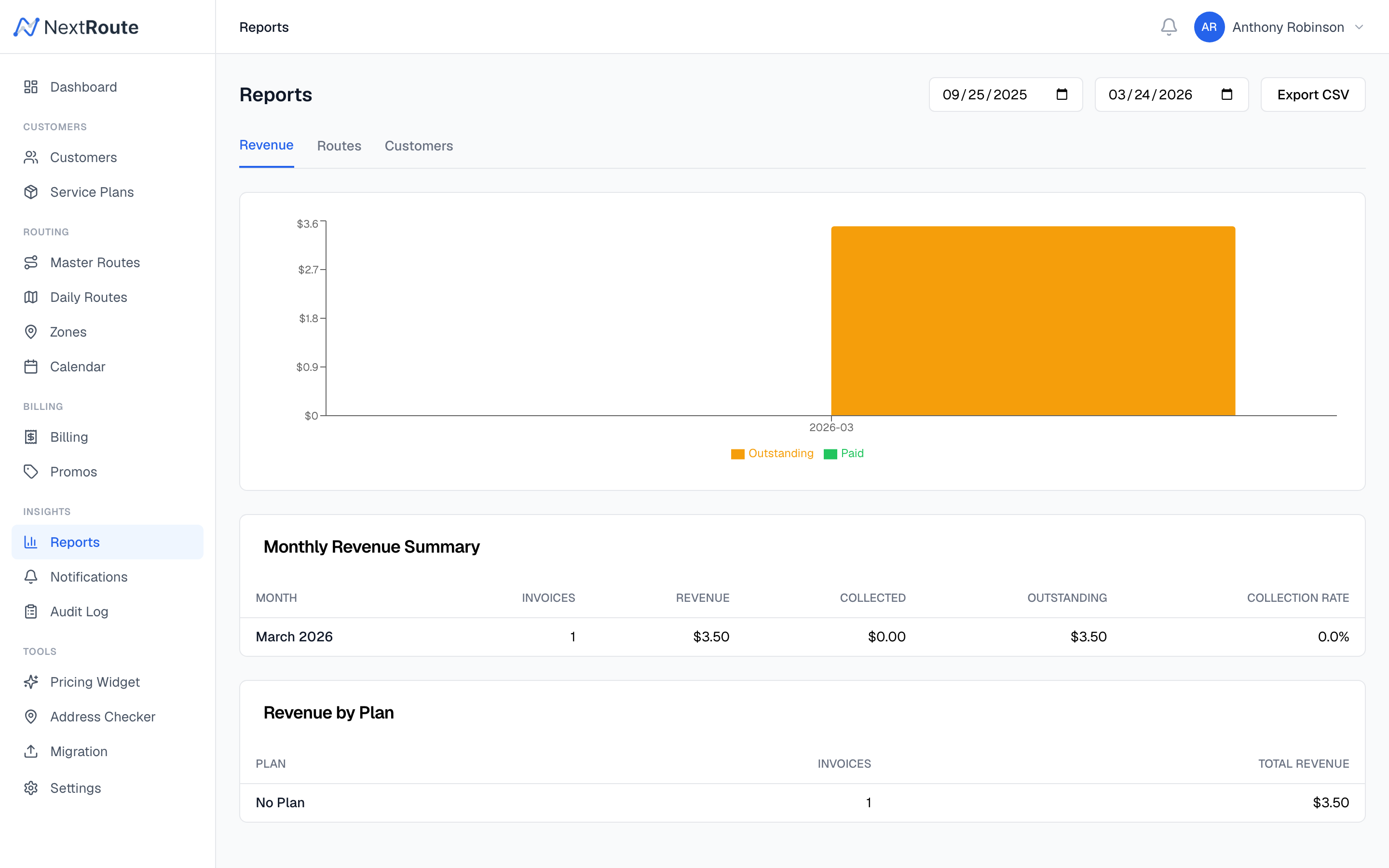
The dashboard displays reports as interactive charts and tables:
- Revenue chart — line or bar chart of revenue over time
- Route efficiency table — sortable table of route performance
- Activity timeline — scrollable feed of recent events
- KPI cards — large metric cards for key numbers
Related
- Auto-Billing — how invoices are generated for revenue tracking
- Daily Routes — route data that feeds efficiency reports
- Live Tracking — GPS data that feeds the activity feed